How the Modern Charging Desk Is Redefining the Way We Use Our Devices
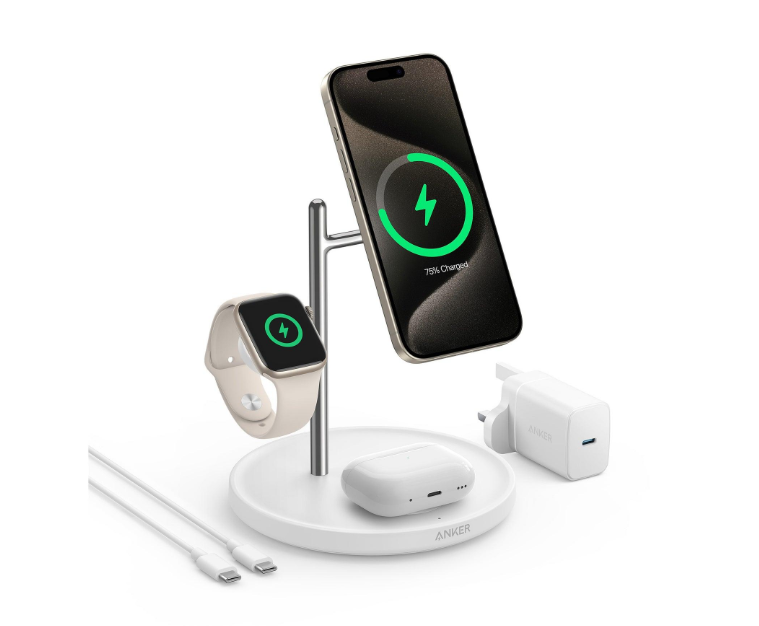
A modern workspace is no longer built around a single computer and a desk lamp. It may contain a smartphone, smartwatch, wireless earbuds, tablet, laptop, and several accessories that support different parts of the working day. Each device has its own charging requirements, yet all of them compete for the same limited resources: electrical outlets, desk space, cables, and time. This is where an iPhone charging station becomes more than a convenient accessory. It represents a shift towards treating personal technology as one connected environment instead of a collection of unrelated devices.
The change is particularly noticeable for people who move between home, office, meetings, and travel. A phone might be used for authentication, communication, navigation, photography, and payments, while a smartwatch tracks activity and earbuds support calls throughout the day. When every device has a separate charging routine, maintaining them becomes another small task that competes for attention. A central charging arrangement can simplify that routine, provided the equipment is selected according to actual device requirements.
Yet organisation alone does not guarantee good charging performance. A phone can remain connected to a modern adapter and still gain battery percentage slowly. The explanation may involve power allocation, cable limitations, thermal protection, battery behaviour, or the phone’s own workload. Understanding these less visible factors reveals why a better charging environment depends on more than purchasing a powerful adapter.
The Desk Has Become a Small Technology Ecosystem
Personal technology has gradually moved beyond individual devices. Smartphones communicate with watches, earbuds connect to tablets and laptops, and cloud services keep information synchronised across several screens. This interconnected environment changes the way people use electricity.
A typical morning illustrates the problem. A person may remove a smartwatch from its charger, disconnect a phone, pick up wireless earbuds, and take a tablet to work. Later, the phone needs another charge while the earbuds are almost empty and the laptop battery is running low. The same collection of devices repeatedly returns to the charging area, but not necessarily at the same time.
A traditional arrangement of separate wall adapters can become inefficient in this environment. Several plugs occupy electrical outlets, cables cross the desk, and devices end up charging wherever a connection is available.
A central charging point creates a more predictable routine. Each device has a designated place, charging accessories remain together, and the workspace becomes easier to manage. For a household with multiple Apple products, this can also reduce the daily effort involved in finding the right cable or adapter.
The important consideration is that a shared charging area should be designed around the devices being used. A setup intended for an iPhone and AirPods may not have the same requirements as one supporting an iPhone, Apple Watch, iPad, and MacBook.
Why the Battery Percentage Does Not Tell the Whole Story
A battery percentage is convenient because it turns a complex electrical process into a simple number. However, it does not reveal how much power is entering the device at a particular moment.
Charging performance changes according to the battery’s current state, temperature, charging circuitry, and the phone’s activity. A device at a low battery level may accept power at a higher rate than the same device approaching its charge limit. As the battery fills, its charging system gradually reduces the incoming current to manage voltage and temperature.
This is one reason the final part of a charging cycle often takes longer than expected. The phone is not necessarily malfunctioning when it moves quickly from a low percentage to a moderate level but slows down near the upper limit.
Battery management also responds to environmental conditions. If a device becomes too warm or too cold, its software may reduce charging speed or temporarily pause the process. This behaviour is intended to protect the battery rather than maximise the speed displayed on a product advertisement.
Consequently, comparing two charging sessions requires more than looking at the elapsed time. The starting battery percentage, surrounding temperature, phone activity, adapter, and cable should be reasonably similar before the results can be meaningfully compared.
The Electricity Behind a Multi-Device Setup
A charging station may look like one compact product, but internally it has to manage several electrical requirements. The power entering the station is converted into suitable outputs, which are then supplied through individual ports or wireless charging surfaces.
The total available output is an important limitation. Imagine a station designed to provide a maximum of 100 watts. That does not automatically mean every connected device can receive 100 watts simultaneously. Instead, the station must distribute its available capacity across the connected equipment.
A laptop may request more power than wireless earbuds, while a smartphone may need a different voltage and current combination. The station’s internal power-management system determines how the available output is allocated.
This process can also change when another device is connected. Some chargers briefly renegotiate power distribution when a new connection is introduced. A device that was charging at one level may temporarily disconnect or resume at a different level.
For this reason, buyers should look beyond the total wattage printed on the packaging. Individual port specifications and multi-port output combinations provide a much more realistic picture of what a charging station can do.
The Small Components That Can Limit a Powerful Charger
A charging system is only as capable as its least suitable component. A high-output adapter cannot compensate for every limitation introduced by a cable, connector, or device.
USB-C is now widely used because it provides a reversible connection and supports modern charging standards. However, the connector alone does not guarantee a particular power level. The charger, cable, and phone must support compatible capabilities and charging protocols.
USB Power Delivery allows compatible devices to negotiate suitable power levels. This helps prevent a charger from simply delivering its maximum advertised output regardless of what the connected device requires.
Cable quality is equally important. Internal conductor design, supported current, connector condition, and overall construction can influence performance. A damaged cable may cause unstable connections, while an unsuitable cable may prevent a charging arrangement from reaching its expected capability.
The physical charging port deserves attention too. Dust, pocket lint, or debris can prevent a connector from seating correctly. If charging becomes intermittent, inspection and appropriate cleaning may be necessary. Metal objects and liquids should never be used to clean a phone’s charging port.
When a Fast Charger Still Produces a Slow Result
Slow charging can be confusing because the charger may appear perfectly normal. The phone recognises the connection, the battery icon shows that charging has started, and yet the percentage increases more slowly than expected.
There are several possible explanations, and they do not all require replacing the charger.
The Power Source Is Below the Device’s Requirements
An older adapter, computer USB port, or low-power hub may supply less energy than a modern phone can accept. The phone will still charge, but the process may take longer.
Using a compatible USB-C Power Delivery adapter can improve wired charging where the original power source is the limitation. However, the phone must support the relevant charging capability for the improvement to occur.
The Cable Is Creating an Unnecessary Bottleneck
A cable that has been repeatedly bent, pulled, or trapped under furniture may develop internal damage. The connector may also become loose after extended use.
Testing with a reliable, compatible cable is a straightforward way to isolate this possibility. If performance improves significantly, the original cable may be responsible for the problem.
The Phone Is Spending Energy While Charging
Charging and operating a phone happen simultaneously. Gaming, video recording, navigation, high-resolution streaming, and video calls all place demands on the processor, screen, and wireless connections.
When these activities consume energy quickly, the visible battery increase can become smaller. In some circumstances, the phone may receive power while using much of it to maintain its current workload.
Temperature Is Activating Battery Protection
Charging produces some heat naturally. Additional heat can come from direct sunlight, demanding applications, wireless energy transfer, or a warm surrounding environment.
When temperatures move outside the preferred operating range, the phone may reduce charging power or pause the process. Moving the device to a cooler, ventilated place and allowing it to return to a suitable temperature can help.
The Battery Is Already Approaching Its Charge Limit
Modern battery systems manage the final stages of charging differently from the earlier stages. A phone may slow down as it approaches a high charge percentage, particularly when battery optimisation features are active.
This is normal behaviour and should not automatically be interpreted as a faulty charger.
Building a Charging Routine That Requires Less Attention
A good charging arrangement should make everyday technology easier to maintain. It should not require users to constantly rearrange cables or remember which adapter belongs to which device.
The first step is identifying which products need regular charging. An iPhone and smartwatch may be used every day, while a tablet or laptop might only require power at certain intervals. Separating essential daily devices from occasional accessories helps determine how much space and output the charging area actually needs.
The second step is assigning a consistent location to each product. A phone stand can keep the display visible, while a designated wireless charging surface can provide a convenient place for compatible earbuds or a smartwatch.
The third step is avoiding unnecessary connections. Every additional device uses part of the available output, so devices should be connected according to priority rather than leaving every accessory plugged in without a reason.
Finally, the charging area should remain ventilated. Chargers and devices naturally produce some heat during energy transfer. Keeping them away from enclosed spaces, thick fabrics, and direct sunlight helps maintain suitable operating conditions.
Choosing a Station Without Paying for Unnecessary Features
Charging stations vary considerably in design. Some prioritise wireless convenience, others focus on multiple USB ports, and certain models combine wired connections with dedicated surfaces for compatible Apple devices.
A useful purchase decision begins with the actual device collection.
For a phone and earbuds: A compact station may be sufficient, especially if wireless charging is supported by both devices.
For an Apple Watch as well: Check whether the station includes a compatible watch charging module rather than assuming that every wireless surface supports it.
For a tablet or laptop: Pay close attention to the available USB-C output. Larger devices may require considerably more power than phones and smaller accessories.
For a shared workspace: Consider the number of simultaneous connections and how the station distributes its total output.
For frequent travel: A foldable design, removable cable, or compact form may be more practical than a large desktop arrangement.
Product descriptions should also be checked for compatibility with the exact device generation. Charging standards and supported features can differ across Apple models, so a product that works with one generation should not automatically be assumed to support every feature on another.
The Role of Standards in a Less Complicated Charging Experience
Charging standards are important because they help devices and accessories communicate in a predictable way. Without compatible protocols, two products may physically connect but fail to deliver the performance expected by the user.
USB Power Delivery is particularly relevant for wired charging because it allows supported equipment to negotiate power. Wireless standards serve a similar purpose by defining how compatible devices transfer energy without a direct cable connection.
MagSafe and Qi2 are relevant examples in the Apple charging ecosystem. Magnetic alignment can improve convenience by helping compatible devices maintain their position on a charging surface. However, magnetic attachment alone does not establish that a product supports a particular certified wireless charging feature.
Anyone researching slow charging should also consider Anker’s guide to why is my phone charging slow. Understanding the relationship between adapters, cables, battery conditions, and device activity makes it easier to identify the real source of a charging problem before spending money on replacement accessories.
A More Reliable Way to Test Charging Performance
Rather than comparing chargers under random conditions, users can follow a simple repeatable process.
Begin with a phone that is not close to its charge limit. Use a compatible adapter and a known-good cable, disconnect unnecessary accessories, and leave the screen off during the test. Record the battery percentage after a consistent period.
If performance appears unusually low, change one variable at a time. Try another cable first, then test a different compatible adapter. For wireless charging, check alignment and case compatibility separately.
This approach makes it easier to identify whether the limitation comes from the power source, connection, environment, or phone itself.
For an even clearer result, compare charging sessions at similar starting percentages and temperatures. A phone tested at 15% in a cool room should not be directly compared with one tested at 75% after extended navigation use.
If slow charging continues despite suitable equipment and normal conditions, professional inspection may be worthwhile, particularly if the port is damaged or the battery shows other unusual behaviour.
Conclusion
The modern charging environment is becoming more connected because people now depend on several devices throughout the day. A central charging station can make that environment easier to manage by reducing cable clutter, creating designated charging spaces, and supporting multiple compatible products.
However, good charging performance still depends on the complete system. Adapter capability, cable quality, power distribution, wireless compatibility, temperature, and battery management all influence the final result.
The most practical approach is to choose equipment that matches the devices being used, understand how its available power is distributed, and maintain a suitable charging environment. When these elements work together, charging becomes a more predictable part of everyday life rather than another problem that repeatedly interrupts it.
Frequently Asked Questions
Why does my iPhone charge slowly even when connected to a powerful adapter?
The phone may be limited by its supported charging input, cable, temperature, battery level, or background activity. A high-wattage adapter cannot make a phone accept more power than its charging system supports.
Can one charging station power several Apple devices at once?
Yes, compatible stations can support multiple devices simultaneously. However, their total output is shared, and individual port limits or wireless charging specifications determine how much power each device receives.
Does connecting another device reduce iPhone charging speed?
It can. Some multi-port chargers redistribute their available output when another device is connected. The actual effect depends on the charger’s power allocation design and the connected devices’ requirements.
Is wireless charging suitable for everyday iPhone use?
Yes, provided the charger supports the appropriate standard for the iPhone model. Alignment, temperature, case compatibility, and adapter specifications can all influence the experience.
How can I improve my iPhone’s charging performance?
Use a compatible power adapter and cable, keep the phone at a suitable temperature, avoid demanding applications during charging, inspect the charging port, and check whether battery optimisation settings are affecting the charging schedule.